Start with what you, the operator, actually need
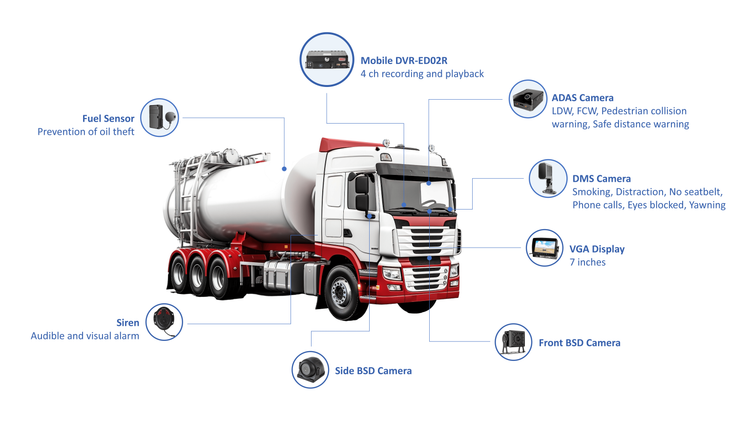
You want clear answers fast: who was at fault, why a truck stopped, whether a loader’s cycle time slipped. That’s why many supervisors turn to AI MDVR early on — it captures video tied to events so you don’t hunt through hours of footage. A modern mdvr camera system that records synchronized views (cab, forward, side) and links that video to GPS and fault codes changes the conversation from “what happened?” to “what do we fix?” I’ve seen that shift firsthand during haul-truck trials in the Pilbara region of Western Australia.
Top data points every fleet manager should track
Focus on actionable signals, not noise. Track these consistently:- Event video with timestamped GPS and vehicle ID (brakes, collisions, near-misses).- Vehicle health telematics: engine hours, coolant temp, fault codes, fuel burn per hour.- Utilization metrics: idle time, loaded vs empty cycles, shift productivity.- Driver behavior: harsh braking/acceleration, speeding over geofenced zones, seatbelt use.- Environmental and site context: weather snapshot, blast windows, restricted zones during shifts.Each item must be recorded with a clear owner and review cadence so the data leads to decisions.
How to capture reliable, usable data
Good inputs make good reports. Use cameras with protected housings and wide dynamic range so glare and dust don’t blind the feed. Sync video to telematics at the point of capture—timestamp mismatches waste hours. Store short, event-triggered clips and longer rolling buffers for investigations. When AI flags risky behavior, verify quickly with the raw clip; that avoids overreliance on automated labels. From field work with crews, I recommend keeping local redundant storage for routine downloads when network bandwidth is limited.
Design reports people will actually read
Reports must answer three user questions: Is the fleet safe? Is it productive? What action do I take now? Structure dashboards around:- One-line health: number of active incidents, top three risk drivers.- Trend charts: weekly utilization and incident rate per 1,000 hours.- Drilldowns: clickable incident video, vehicle fault history, driver log.Avoid dumping every metric in one view. Give supervisors a concise summary and the ability to open the exact clip tied to a KPI—nothing beats a short verified clip for resolving disputes.
Common mistakes crews make—and how to avoid them
Teams often collect too much or the wrong stuff. Typical pitfalls:- Recording everything without tagging: creates an unusable backlog.- Ignoring poor camera placement: a blind spot becomes a blind investigation.- Treating reports as audit artifacts instead of decision tools: metrics should prompt actions like retraining, maintenance, or route changes.Set naming conventions, enforce daily quick-checks for camera alignment, and map each KPI to a specific corrective step.
Alternatives and practical trade-offs
You can rely on telematics only, driver apps, or full video suites. Telematics gives strong utilization and engine data; it won’t prove what happened at an intersection. Driver apps can capture crew input but suffer inconsistent usage. Full mdvr solutions cost more upfront but collapse investigation time and reduce liability exposure. Choose based on whether your priority is incident proof (pick MDVR), margin through utilization (telematics-first), or behavioral coaching (apps plus occasional video).
Putting the pieces together—making data work for you
Start small: map three decisions you want to improve (safety investigations, maintenance scheduling, cycle-time losses). Then tie each decision to one video-enabled metric, one telematics signal, and a simple review cadence. Train users to trust clips over memory, assign ownership for each metric, and schedule brief reviews that end with a named action. That pragmatic loop turns raw feeds into steady improvements and reflects the practical support teams expect from BSJ.